


Paramount+
2.75.42K Reviews
App Specs
- Version
- 16.4.1
- Updated On
- License
- Free
- Downloads
- 10,000,000+
- Developer
- CBS Interactive, Inc.
- Categories
- Entertainment
- Platform
- Android
Screenshots

 Analysis by AppCompare
Choosing a streaming app is less about finding one service with everything and more about finding the one that matches what you actually watch. I’d consider Paramount+ when CBS programming, familiar cable-network shows, exclusive series, films, or live sports are likely to make it into my week. If those are occasional interests rather than regular viewing, a different service—or simply rotating subscriptions—may make more sense.
Start with the shows and events you care about
Before installing another entertainment app, I’d make a short list of the specific programs, franchises, or sports you hope to watch. A broad catalog can look appealing, but it only earns its place in your routine if you can name something you’ll press play on. Paramount+ brings together several kinds of programming, so it can suit a household whose tastes don’t neatly fit one genre. That variety is useful, but it doesn’t mean every viewer will find the same amount worth watching.
It’s also worth separating “available on the service” from “available in the way I want to watch.” A live event is a different experience from a series you can start whenever you like: timing matters, and a scheduled game may be the main reason to open the app that day. If your priority is on-demand viewing, judge the service by the shows and films you’ll return to, not just by the promise of live programming.
A better fit for some viewing habits
I see the strongest case for this app when someone already follows CBS or one of the familiar entertainment brands represented in its library, or has a particular exclusive series in mind. It can also be a practical shared option when one person wants a drama, another wants a comedy, and someone else is looking for a family-friendly cartoon. Instead of opening separate apps for each mood, the household can start by checking one collection.
For example, picture a weeknight when I have half an hour before bed and the rest of the household wants a film. I’d look for a short episode or a movie everyone can agree on, then use profiles to keep separate viewing habits from shaping each person’s recommendations. For a weekend game, I’d plan around the live schedule rather than assume the event can be treated like an ordinary episode. That small distinction can prevent a frustrating last-minute search.
Where competing services can be the smarter pick
Streaming alternatives tend to make more sense when their particular catalogs line up better with your taste. A service centered on a different studio’s shows may be the better home for a fan who mainly follows that studio’s franchises; a film-focused option may suit someone who watches movies far more often than television; and a general on-demand library may be a stronger match for a viewer who rarely watches live sports or CBS programming. I wouldn’t choose by the length of a catalog alone. I’d compare the titles I actually want to watch.
There is a trade-off between breadth and focus here. Having different kinds of entertainment under one roof can reduce app-hopping, but it doesn’t guarantee that the newest thing you want is available. Catalogs and sports access can depend on the specific program and viewing context, so I’d check for the title or event that matters before making this my main service. If nothing in its distinctive mix attracts you, another app can be the more satisfying choice even if its overall library sounds less varied.
Worth Reading Before You Choose

EA SPORTS FC Mobile 26 Is a Bigger Football Game, but It Takes Time

Flipboard Shows What News Apps Must Do Beyond the Feed

Switching to Android Auto Means Rethinking Your Driving Routine

Google Calendar Makes a Crowded Week Easier to Manage

Ludo King Makes the Most of the Minutes Between Plans

Baby Panda World Brings Quick Play to Modern Phones, but Its Game Library Feels Busy
Small habits that make the app easier to use
Search is most helpful when I already know what I want; browsing is better when I’m open to a familiar brand or genre. For a household with several viewers, separate profiles are more than a cosmetic setting: they help keep one person’s viewing from steering another person’s recommendations. I’d set those up early, before everyone starts watching from a single profile, and give each viewer a simple habit of returning to their own space.
Offline downloads can be useful when a connection may be unreliable, such as on a journey or during a wait away from home. I’d download a specific episode or film ahead of time and check that it is ready before leaving, rather than treating downloads as a substitute for a dependable live stream. This is also a sensible way to avoid relying on mobile data for a planned watch. The key trade-off is preparation: downloads help with chosen on-demand viewing, not with an event you expect to watch live.
On a phone, I’d treat the app as a convenient way to browse, save a viewing plan in my head, or watch during a quiet moment, rather than assuming every session is best on a small screen. For a longer film night, a television may be more comfortable if the app is available on the device you use. Moving between screens can be handy, but I’d still check that the relevant title is accessible where I intend to watch it instead of waiting until everyone is seated.
What’s in the Box?
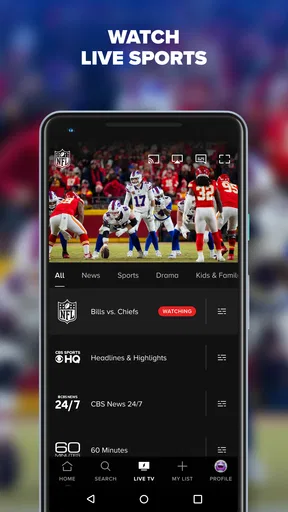
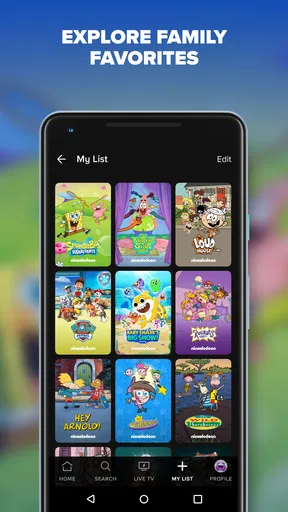
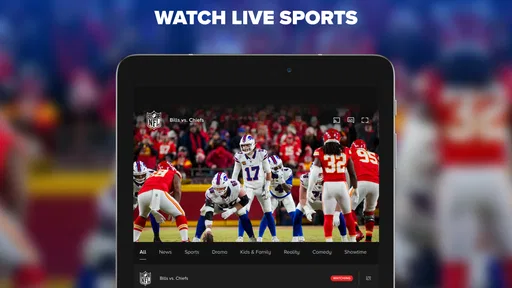
Alright, first things first. What exactly does Paramount+ offer? Well, imagine a vault filled with a mix of classics, exclusive originals, and live TV. That’s precisely what you get here. From nostalgic hits like “SpongeBob SquarePants” to the gripping drama of “The Good Fight,” there’s something for everyone. Plus, if you’re a sports fan, you can catch live events like NFL games or the UEFA Champions League. Pretty neat, right?
Content Galore
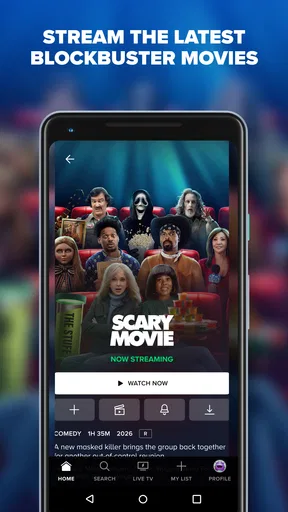
Let’s break down the content a bit more. One of the standout features of Paramount+ is its extensive library. You’ve got CBS, BET, Comedy Central, MTV, and Nickelodeon all under one roof. This means access to a variety of genres, whether you’re in the mood for a comedy, drama, or a bit of both. And for those who love a good film night, there’s a solid selection of movies to choose from.
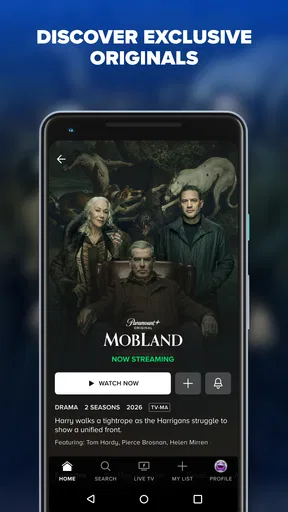
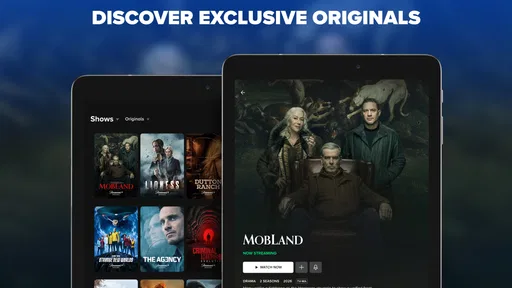
But what really caught my attention are the originals. Shows like “Star Trek: Discovery” and “The Stand” are exclusive to the platform. These originals offer something you won’t find anywhere else, making it a must-have for fans of these franchises.
User Experience
Now, let’s talk about the app’s interface. Navigating through Paramount+ is a breeze. The layout is clean and intuitive, making it easy to find what you’re looking for. Whether you’re searching for a specific title or just browsing, the app’s search function is pretty spot on. And if you’re like me and watch on multiple devices, you’ll appreciate the seamless experience across smartphones, tablets, and smart TVs.
Setting up your profile is straightforward, and you can even create multiple profiles for different family members. This way, everyone gets personalized recommendations based on their viewing habits. Plus, the app allows for offline downloads, so you can watch your favorite shows and movies on the go without worrying about data.
Pricing and Plans
When it comes to pricing, Paramount+ offers a couple of options. You can go for the ad-supported plan if you’re looking to save a few bucks, or opt for the premium plan that’s ad-free and includes live TV. Personally, I found the premium plan to be worth it, especially if you’re someone who can’t stand interruptions during a binge-watch session.
They also offer a free trial, so you can take the service for a spin before committing. It’s a great way to test the waters and see if it fits your streaming needs.
The Final Take
So, is Paramount+ worth it? In my opinion, absolutely. With its vast content library, exclusive originals, and user-friendly interface, it’s a solid contender in the streaming world. Whether you’re a fan of classic TV shows, a sports enthusiast, or someone who loves discovering new series, there’s plenty here to keep you entertained.
Of course, like any service, it has its quirks, but the overall experience is pretty satisfying. So, if you’re looking to shake up your streaming routine, give Paramount+ a try. Who knows? You might just find your next favorite show.
What to know before you install
This is an entertainment app from CBS Interactive, Inc., and it is free to install. The free download should not be confused with unlimited free viewing: the service has paid options, and in-app purchases range from about one dollar to around one hundred and forty dollars per item. I’d check the plan and purchase details shown in the app before signing up, especially if you’re trying to keep a monthly entertainment budget predictable.
The app is rated for teens, so it is not automatically a children-only space just because Nickelodeon is part of its broader mix. If younger family members will use it, I’d choose their profile and viewing setup deliberately, and an adult should check the available controls rather than assuming the brand mix determines what appears. The app’s current version is 16.4.1, and it requires Android 7.0 or later. On an older phone, checking compatibility before planning a trip or family movie night can save a rushed installation attempt.
Its audience is substantial, with over ten million installs, but user feedback is mixed: the average rating is 2.7 from around seventeen thousand ratings, alongside about five thousand four hundred written reviews. I wouldn’t treat that figure as a verdict on every device or household. I would treat it as a reason to test the parts that matter to me early: signing in, finding a specific title, and checking playback on the screen I plan to use.
Try it without turning it into another obligation
My practical approach would be to start with one intended use, not a vague promise to watch more. Pick a series, film, or live event you already care about, then see whether the app makes that viewing easy enough to repeat. If you’re comparing it with another service, make the comparison concrete: which one has the program you want tonight, which one serves the rest of your household, and which one you would actually open next week?
That test also helps answer whether it belongs in a regular rotation. A fan of its exclusive shows or relevant live sports may get a clear reason to keep it. Someone who watches only an occasional title can consider subscribing only when there is something specific to see, then reassess rather than letting several rarely used services pile up. I find that kind of deliberate rotation more useful than paying for a broad catalog simply because it sounds impressive.
There’s a difference between an app being easy to navigate and it being the right service for you. In my experience, Paramount+ is most convincing when its particular combination of familiar network programming, exclusive series, films, and live events overlaps with your real habits. If your priority is a different studio’s catalog, a deeper focus on films, or a service you can use without paying for access, I’d look elsewhere. If those distinctions don’t matter and you want a mix of viewing options in one place, it’s a reasonable app to try.
My recommendation is therefore specific rather than universal: install it if you can name a show, event, or household use that makes the app valuable this month. Check the viewing and purchase terms before committing, set up profiles for separate viewers, and download chosen on-demand titles before you lose a reliable connection. If the catalog doesn’t quickly give you something you genuinely want to watch, don’t keep it out of habit. That is the fairest way to decide whether this service earns a place beside your other streaming apps.
Pros
- Extensive library of movies and TV shows.
- Exclusive access to CBS originals.
- User-friendly interface with easy navigation.
- Offline download feature available.
- Multiple profile support and parental controls.
Cons
- Limited international content availability.
- Occasional streaming quality issues.
- Ads present in lower-tier plans.
- No free trial option for some users.
- Content library varies by region.
FAQs for Paramount+
What is Paramount+ and what content does it offer?
Paramount+ is a streaming service that provides a wide array of content, including movies, TV shows, live sports, and exclusive original series. Subscribers can access content from popular networks like CBS, Nickelodeon, and MTV, as well as Paramount Pictures' film library. It's ideal for viewers seeking diverse entertainment options.
How much does a Paramount+ subscription cost?
Paramount+ offers different subscription plans to cater to various needs. Typically, there are options for an ad-supported plan and a premium ad-free plan. Prices can vary based on region and any promotional offers available. It's advisable to check their official website for the most current pricing details.
Is Paramount+ available for offline viewing?
Yes, Paramount+ allows subscribers to download select content for offline viewing. This feature is especially useful for users who wish to watch movies or shows without an internet connection. However, not all content may be available for download due to licensing agreements, so it's best to check the app for specific titles.
On what devices can I watch Paramount+?
Paramount+ is compatible with a wide range of devices, including smartphones, tablets, smart TVs, and gaming consoles. It also supports major platforms like iOS, Android, Roku, Amazon Fire TV, and Apple TV. This flexibility ensures that users can enjoy content on their preferred device, anywhere and anytime.
Does Paramount+ offer a free trial?
Paramount+ often provides a free trial period for new subscribers. This trial allows potential users to explore the service's offerings before committing to a subscription. The duration and availability of the free trial may vary, so it's recommended to visit the Paramount+ website for the latest information on any trial offers.


